Sync your Even Realities G2 smart glasses to-do list with your normal to-do app
The glasses to-do list has no API. It turns out the phone app keeps the list in a local file, and that file is the integration point.

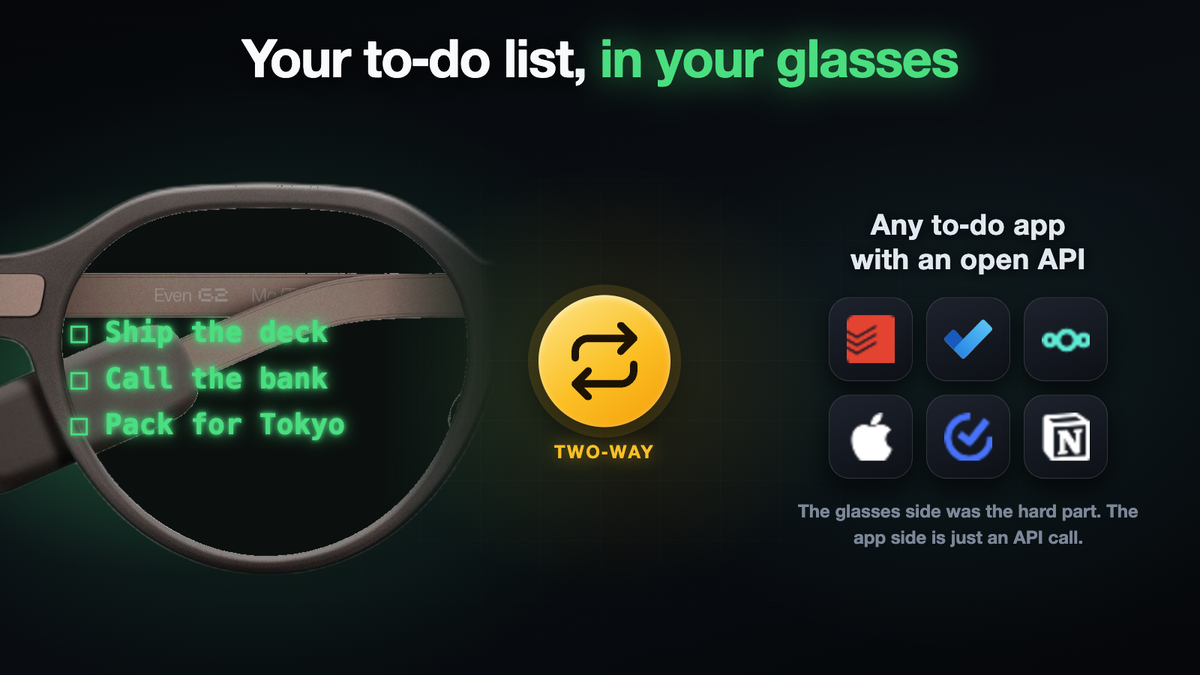
Even Realities G2 smart glasses have a to-do list you can see in the lens. It's very convenient, but unfortunately, there's no API for it.
By default, you cannot read that list from anywhere else, and you cannot add to it except by hand on the glasses or in their phone app, so it sits on its own island away from whatever real to-do app you already use.
Here's how to enable two-way sync between the glasses and your favorite to-do app:
🤖 Want an agent to just build this for you? Copy the prompt and paste it at a coding agent like Claude Code or Codex.
⚙️ Requirements
- 📱 Rooted Android phone
- 👓 Even Realities glasses
- 💻 Host (laptop or server) that can reach the phone over adb
Use Tailscale or something similar to make it work across the internet - ✅ A to-do app with an open API
Example: Todoist, Microsoft To Do, Google Tasks, TickTick, Nextcloud Tasks
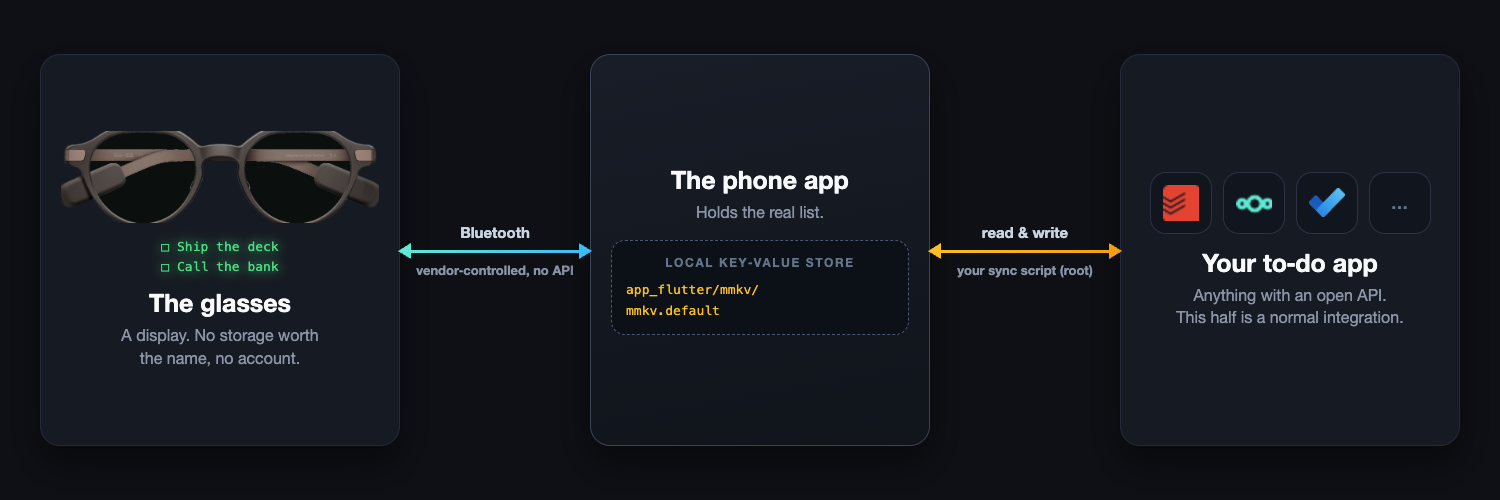
The list is not in the glasses
The glasses are a display. They hold almost nothing, they have no account, and everything they show arrives over Bluetooth from the companion phone app. Talking to the glasses directly means reverse-engineering a proprietary Bluetooth protocol, which is a lot of work for a feature the phone already has in plain form.
The phone app stores the list locally, in the app’s private data directory, in a key-value store file. On a rooted (aka how computers like a laptop normally work) Android phone that file is readable and writable like any other.
On my phone it sits at app_flutter/mmkv/mmkv.default inside the app’s data directory, with a small sidecar file next to it holding the checksum.
Two kinds of entry matter:
One entry per task, keyed global_quicklist_note_cache_<id>. The value is a small JSON object: the title, a status that reads active or completed, timestamps, and fields for ordering and reminders.
{
  "id": 1585750079,
  "groupID": 0,
  "source": "manual",
  "status": "active",
  "title": "Buy coffee filters",
  "content": null,
  "aiOriginal": null,
  "aiSummary": null,
  "createdAt": "2026-09-17T01:11:43.803577Z",
  "updatedAt": "2026-09-17T01:11:47.106997Z",
  "position": {
    "position": 100000.0
  },
  "reminder": {
    "dateOn": false,
    "timeOn": false,
    "date": null,
    "timeSec": null
  }
}
One index entry, keyed global_quicklist_all_note_keys. It is an array of every task id that currently exists, as strings.
[
  "1585750079",
  "1585750112",
  "1585750240"
]
Reading
Add a task on the glasses and it appears in that file within a second or two. Pull the file off the phone, parse the entries, and you have the list.
After that it is an ordinary sync problem:
- Diff what you just read against what you saw last time. (Keep track of the mapping to tell a new task from one already synced).
- For anything new, create it in your to-do service and record the mapping between the glasses id and the id your service handed back.
- For anything whose status flipped to
completed, complete it on the other side.
Writing
The other direction is the same idea backwards: add a task entry, add its id to the index entry, and the app picks it up and pushes it to the glasses.
- Disable the app. Killing it is not enough; Android relaunches it within a couple of seconds. If the app is running when you write, it overwrites you from memory.
- Add the task entry, and add its id to the index entry. Both, or the app ignores it.
- Recompute the checksum and confirm it matches before writing to a phone with real tasks on it. (Verify your value matches what the device already holds before you touch a phone with real data on it. Read the storage library’s own source for this rather than guessing)
- Re-enable the app. Wire this to every exit path, crashes included.
Syncing Automatically
My VPS uses tailscale to reach the phone via adb (this way my AI agent can edit my phone at any time, not just for this sync but for other uses as well). I run a cronjob every minute to sync the glasses todo list with Nextcloud tasks (but you can sync it with any to-do app with an API, ex: Todoist, Microsoft To Do, Google Tasks, TickTick, etc).
It might be possible to collapse it to one device. Everything the sync does could run on the phone itself under a terminal emulator, since the file, the root access and the network are all right there, and that removes the second machine entirely.
“Hey Even”, could we get an API?
This works, but a dedicated API would be a lot easier, and it's more normie friendly
So far on my Even Reality glasses I've:
- Replaced the default Even AI with my own Claude Code running locally on my server
- Synced the glasses to-do list with my to-do app
- Got programatic access to read translation transcripts (The G2 keeps a transcript whenever you run translation mode).
The G2 are the first pair I have worn all day without thinking about them. I would just like to plug things into it :)